Data Format
Required Data
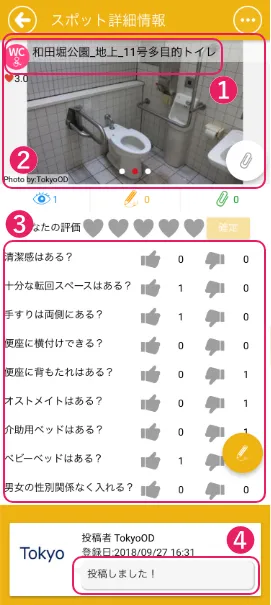
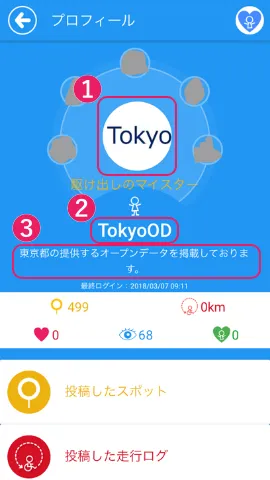
Please prepare ① Spot data and ② User data.
| ① Spot Data | ② User Data |
|---|---|
 |  |
Download the official WheeLog! data format here
① Spot Data
- data_excel.xlsx (data input sheet)
- photos (facility photos)
data_excel.xlsx (data input sheet)
-
Columns A–E: "Spot ID", "Spot Name", "Latitude", "Longitude", and "Category" are required. (Highlighted in orange in the Excel file)
-
Enter unique location data for each spot. Do not reuse the same coordinates for different features (restroom, elevator, parking, etc.) within the same facility.
-
Column A "Spot ID" must be sequential. Example: toilet_1, toilet_2, toilet_3
-
Either Column F "Comment" or a photo file is required.
-
Columns G onward are optional. Enter any additional information you have available.
-
Leave the "Poster User ID" field blank when submitting.
-
Enter data on separate sheets per category. See here for category details.
-
For evaluation items in Column M onward on each sheet, enter ○ or ×.
-
Google Place ID can be looked up. Search here
Required Fields
| Column | Field Name | Description | Format |
|---|---|---|---|
| A | Spot ID | Enter sequentially by category. Example: toilet_1, toilet_2, toilet_3 | String (half-width) |
| B | Spot Name | Enter the spot name. Example: XX Station ●● Exit Accessible Restroom | String |
| C | Latitude | Enter the facility's latitude. | String (half-width numbers) |
| D | Longitude | Enter the facility's longitude. | String (half-width numbers) |
| E | Category | Choose from: toilet, elevator, parking, slope. | String (half-width) |
| F | Comment | Notes, supplementary info that's hard to convey with photos, etc. | String |
Optional Fields
| Column | Field Name | Description | Format |
|---|---|---|---|
| G | Country | Enter the country where the facility is located. | String |
| H | Address | Enter the facility address. | String (half-width numbers) |
| I | Phone number | Enter the facility's contact phone number. | String (half-width numbers) |
| J | Website URL | Enter a website with information about the facility. | URI |
| K | YouTube link URL | Enter a YouTube URL if available. | URI |
| L | Google Place ID | Enter the Google Place ID associated with the facility. | String (half-width) |
| M~ | Evaluation items (Col M+) | For evaluation items in each sheet's column M+, enter ○ or ×. | String |
photos (facility photos)
-
Place photos for each spot in a separate folder, one folder per spot.
-
Please organize folders by Spot ID.
-
Submit photo files in JPG or PNG format.
-
Use only half-width alphanumeric characters and symbols in file names — do not use full-width characters such as Japanese.
-
Keep each photo file under 2 MB.
ExampleFolder name: toilet_1 File names: toilet_1_1.jpg, toilet_1_2.jpg, toilet_1_3.jpg
② User Data
- id.txt (user ID information)
- id.png (profile image)
id.txt (user ID information)
-
The posting user ID must be 32 characters or fewer, using alphanumeric characters, hyphens (-), and underscores (_).
-
The profile comment must be 2,000 characters or fewer.
-
Based on the information provided, a WheeLog! user ID will be issued at the time of the initial data import.
-
One user ID will be issued for use by the organization.
-
With a user account, data can be updated from the smartphone app.
Note- Please note that data cannot be updated from a computer (browser).
- For how to use the app, please refer to here.
id.png
-
The profile photo must have a 1:1 aspect ratio.
-
Submit the image file in PNG or JPG format.
-
If you are unable to prepare a profile photo, the office can create an image with the location name in English. Please contact us if you would like this. (Reference: https://wheelog.com/hp/opendata )
Folder Structure
- Please organize and store the prepared files in the following folder structure.
wheelog_format.zip
├── data_excel.xlsx
├── id.txt
├── id.png
└── photos
    ├── toilet
    │   ├── toilet_1
    │   │   ├──toilet_1_1.jpg
    │   │   ├──toilet_1_2.jpg
    │   │   ├──toilet_1_3.jpg
    │   │   ├── ...
    │   │
    │   ├── toilet_2
    │   ├── toilet_3
    │   ├── ...
Data Usage Policy
-
Data within the app is managed in accordance with WheeLog!'s operational rules.
-
If the quality of spot data, TrackLogs, accounts, or other data is deemed unable to be guaranteed, WheeLog! may edit or delete such data at its discretion. Please be aware of this in advance.
-
Data is managed in accordance with the WheeLog! Terms of Service and Privacy Policy below. Regarding data handling in particular, please review "Article 6: Consented Matters" in the Terms of Service.
References- Terms of Service: https://wheelog.com/hp/app_terms
- Privacy Policy: https://wheelog.com/hp/privacy