Checking Accessibility Information
You can check barrier-free information for wheelchair-accessible facilities and streets.
Main Menu
Access each feature from the menu bar at the bottom of the screen.
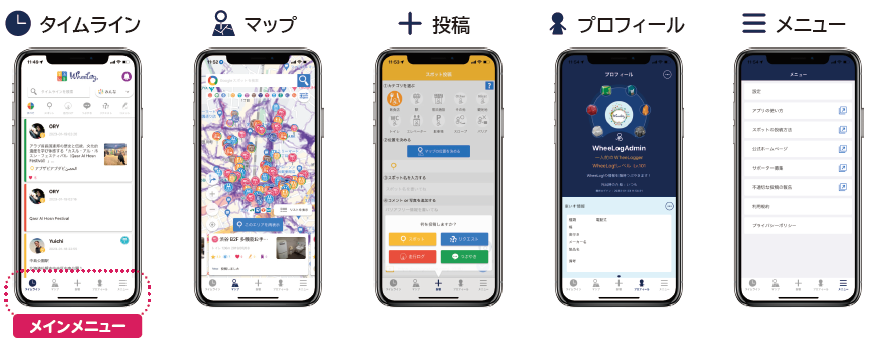
- Map — Displays the map.
- Post — Post spots or TrackLogs.
- Timeline — View posts on the timeline.
- Blog — Check announcements from WheeLog!
- My Page — View your posts and TrackLogs.
Timeline
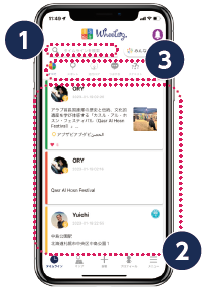
1. Search
Search for posts on your timeline.
2. Timeline
Browse posts from other users on your timeline.
3. Category icons
Tap a category icon to filter and display only posts in that category.
Map
1. Viewing spots on the map
You can see barrier-free spots and wheelchair TrackLogs on the map.
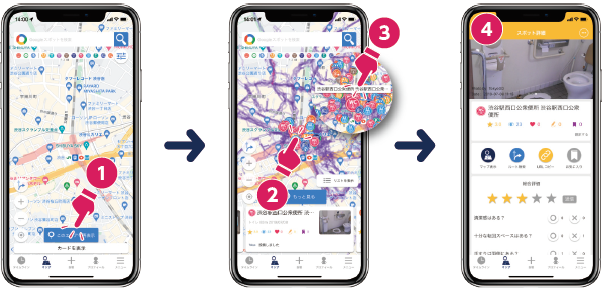
- Move to the area you want to display and tap "Refresh this area"
- Tap a spot icon
- Tap the spot title that appears
- View the spot details
2. Filter display settings
Change the map display settings to show only the information you need.
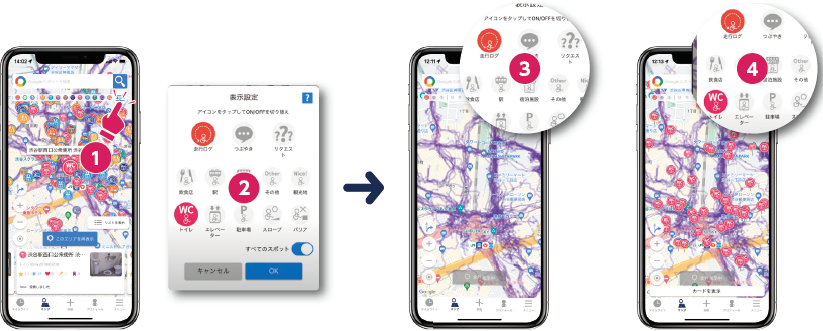
- Tap the settings icon
- Select the items you want to display
- Example: display TrackLogs only, or display TrackLogs and restrooms together