Editing Spots
Editing Your Own Spots
You can edit and update the content of spots you have posted (photos, comments, ratings, etc.) at any time.
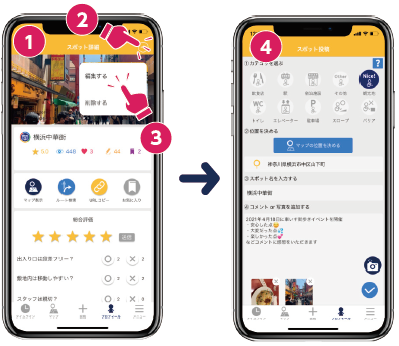
- Open the detail screen of the spot you want to edit
- Tap "Edit" from the menu (or edit icon) in the top right
- Make your changes and tap the checkmark button to finish
Correcting Spots Posted by Other Users
If the information on a spot posted by another user is incorrect (e.g., the location is off, the facility has closed, etc.), you can request a correction from the WheeLog! office.
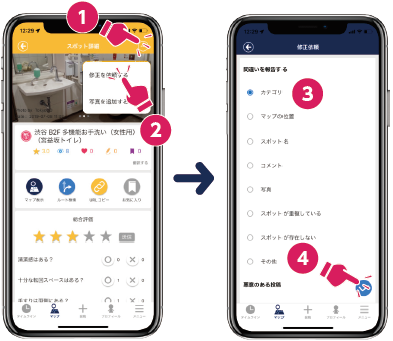
- Open the detail screen of the relevant spot
- Tap "Request Correction" from the menu
- Select the item(s) that need correcting, write the specific correction in the comment field, and submit
info
- Submitted requests are reviewed by the WheeLog! office and corrections are made in order.
- Corrections may take up to one month to be reflected.
- Please note that some requests may not be possible to fulfill.